Anyone who has produced a short video, social post or client project knows the friction that arrives once the visuals are done. You have the footage or the generated clip ready, but the soundtrack, voiceover and effects still need sorting. Usually this means you’re jumping between separate apps, hunting for royalty-free tracks that won’t trigger
Anyone who has produced a short video, social post or client project knows the friction that arrives once the visuals are done. You have the footage or the generated clip ready, but the soundtrack, voiceover and effects still need sorting.
Usually this means you’re jumping between separate apps, hunting for royalty-free tracks that won’t trigger a takedown, or paying for licensed music that still doesn’t quite fit the timing.
Adobe has now moved those 3 audio tasks inside Firefly itself.
Generate Music, Generate Speech and Generate Sound Effects are generally available to everyone, turning the platform into a single place where image, video and audio can be created together.
Commercially safe tracks tuned to your video
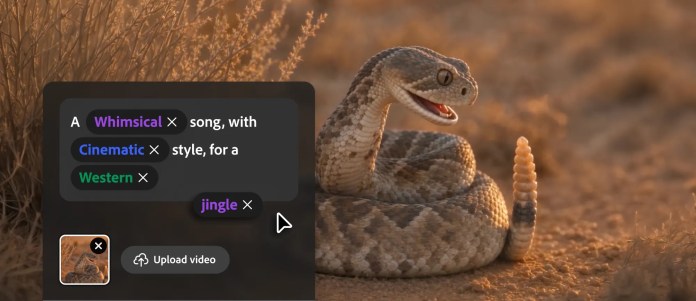
Generate Music is powered by Adobe’s own Firefly Music Model. You describe the mood, genre or energy you need, or let the system analyse an uploaded video, and it produces an original instrumental track matched to the length of your content.
Adobe says the tracks carry universal licensing, meaning they are cleared for commercial use without the usual risk of copyright claims or sudden platform removals.
Local content producers have long faced the same licensing headaches as their international counterparts: the perfect track sits behind a paywall, or a free one carries usage restrictions that make client delivery risky.
Adobe positions the new tool as a direct answer to that pain.
Fashion and lifestyle creator Esther Rehema described the change in practical terms.
“Going back to school and trying to stay consistent as a content creator can get really overwhelming. I love that Adobe Firefly has made my creative process so much easier. Being able to find music that is safe for commercial use and fits my content is such a game changer. What used to take me hours and hours of searching for the right song can now take seconds.”
Esther Rehema, content creator.
Madeline Salazar, who combines Photoshop, Firefly and effects work for brand clients, focused on the delivery side.
“When I am making content for a brand, there is always the complication of licensing the background music. Using Generate Music I am able to create a soundtrack that is unique to the video I’m making, and it gives me peace of mind because I know the music is safe for commercial use. When I deliver something to a client, I’m putting my name behind the entire project, so being able to create original music for the piece, and feel confident about handing it over, is really important to me.”
Madeline Salazar, content creator.
Those experiences line up with findings from a Berklee College of Music survey that Adobe supported. Nearly 80% of the video creators, musicians and marketers surveyed post content daily or several times a week, and every respondent said they use music.
Natural voiceovers with control over delivery
Generate Speech converts a written script into spoken audio. Creators choose Adobe’s Firefly Speech Model or the option to use ElevenLabs. Controls cover voice selection, pacing, emotion and emphasis, so the delivery can shift from calm narration to more energetic presentation without re-recording.
The system supports more than 20 languages. Adobe’s own model covers English (including Indian and American accents), Spanish variants, French, German, Italian, Hindi, Dutch and Mandarin.
The ElevenLabs Multilingual option adds further reach, including Australian English among its English accents. That flexibility is useful for Australian producers creating content for both local and international audiences, or for agencies handling multilingual campaigns.
You can fine-tune pronunciation for product names or local place names, insert pauses, and adjust pitch and speed. The result is not meant to replace professional voice talent for high-end advertising, but it removes a common bottleneck for social clips, product tutorials, e-learning modules and podcast inserts.
Sound effects that match the action
Generate Sound Effects rounds out the audio set. Powered by the Firefly Audio Model, it creates custom effects that follow the timing and energy of the scene. Creators can describe the sound in text or supply a reference audio cue. The system then generates effects that sit in sync with the visuals rather than requiring manual placement and stretching later.
Together the three tools aim to keep the entire soundtrack process inside one workspace. Adobe argues this reduces the constant switching that breaks creative flow. For short-form social content, live vlogs, product demos and quick client deliverables, that consolidation can shave real time off the production cycle.
Firefly AI Assistant and more model choice
Alongside the audio tools, Adobe is expanding the free tier of its Firefly AI Assistant. Users now get a daily generation allowance that lets them test the assistant without a paid plan. The assistant already handles tasks such as creating storyboards and building brand kits. Adobe says those two skills rank among the most used.
The company is also adding Gemini Omni Flash to the growing list of partner models available inside Firefly. It joins existing options from Google, Kling AI, Luma AI, OpenAI and Runway. Gemini Omni Flash accepts video, audio, image and text prompts in a single request, which Adobe says helps turn rough ideas into storyboarded first cuts more quickly.
These additions continue Adobe’s push to make Firefly an all-in-one creative AI studio rather than a pure generation tool. Elements (saved characters, locations and objects that stay consistent across projects) and Projects (organised asset collections) remain part of the broader workflow improvements introduced earlier in 2026.
Pricing and access for Australian users
The audio tools sit inside the existing Firefly plans and draw on generative credits. Adobe does not charge a separate subscription for music, speech or sound effects.
Australian pricing currently starts with a free plan that offers limited daily generations. Paid tiers include Firefly Standard at A$16.49 per month (including GST) with 2,000 generative credits, Firefly Pro at A$32.98 per month with 4,000 credits, and higher plans that deliver more credits and additional features such as full Photoshop web and mobile access.
Generate Sound Effects and certain partner models consume credits from the monthly allocation, so heavy users will need to monitor usage or move to a higher tier.
The tools are available now at
firefly.adobe.com
for anyone with an Adobe account.
For more tech updates, stay tuned to our blog.