
If you’ve ever tried to balance note-taking while actually paying attention in a meeting, interview, or even at a conference, you’ll know how quickly things fall apart. You either miss key details, or you’re so focused on typing that you’re barely present in the conversation. That’s where the soundcore Work AI Voice Recorder comes in.
If you’ve ever tried to balance note-taking while actually paying attention in a meeting, interview, or even at a conference, you’ll know how quickly things fall apart. You either miss key details, or you’re so focused on typing that you’re barely present in the conversation.
That’s where the soundcore Work AI Voice Recorder comes in. It’s a small, lightweight recorder that leans heavily into AI transcription, but more importantly, it’s designed to stay out of your way.
After spending some time with it, I think that’s exactly where it shines.
Small, magnetic design that’s easy to live with
The first thing that stands out is just how small this thing is. It’s genuinely compact enough that you forget it’s there, which is kind of the point. The soundcore Work AI Voice Recorder is about the size of a ten cent coin… if you remember what those are.

The entire device is magnetic, which means it’ll snap straight onto the back of your phone if you’re using a MagSafe-compatible case. If you’re not, soundcore includes a magnetic ring in the box, so you can still get that same experience without changing your setup.
In practice, this is one of those features that sounds minor but ends up being incredibly useful. Being able to attach it directly to your phone means one less thing to carry, and it keeps everything together when you’re moving between meetings or events.
There are also a couple of other ways to wear it. You can clip it onto a jacket or wear it as a pendant, which is handy depending on the situation. It’s flexible enough that you’ll find something that works.

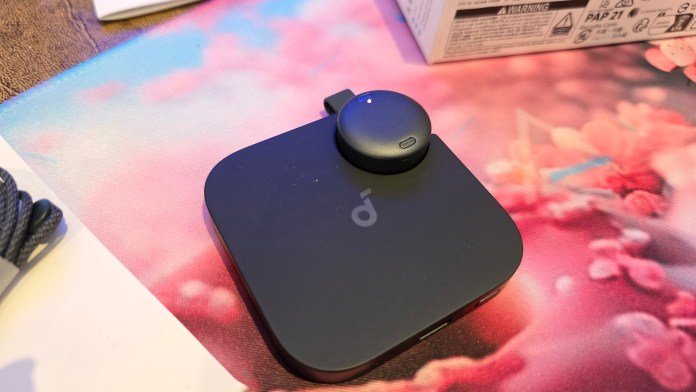
Charging is equally simple. It snaps into a base, and importantly, it’s still fully functional while docked. That means you can record, transfer data, and mark timestamps while it’s charging. No waiting around at the end of the day just to access your recordings.
Setup and app experience
Like most things in this category, the app is essential. You’ll need it for pretty much everything, from setup through to transcription. The good news is that the soundcore app is already used across their ecosystem, so you don’t need to install something new if you’re already in that world. It’s also not overly heavy, which is always appreciated.
Setup is straightforward. After logging in and authenticating, the app quickly found my soundcore Work AI Voice Recorder device, and the onboarding process is guided with simple instructions and even gifs showing exactly what to do. It’s hard to get lost.

Once you’re in, the app becomes the control centre:
- It clearly shows whether you’re recording
- You can pause recordings
- There’s a mute option if you need to quickly stop capturing audio
- Firmware updates are handled directly in-app
There’s also a large physical button on the device itself to stop recordings, which is a nice fallback when you don’t want to reach for your phone, and it makes it incredibly easy to use on the go.
Recording experience: Thoughtful touches
Recording itself is simple, but there are a few smart touches that make a huge difference.
The standout is the ability to double tap the device to mark a timestamp. If you’re in a long interview or meeting and something important happens, you can flag it instantly. No digging through audio later trying to find that one moment. It’s one of those features that feels small, but once you start using it, it becomes essential.

Transcription: The real highlight
Let’s be honest, this is the reason you’d buy something like this. The soundcore Work AI Voice Recorder does all the transcription for you. After recording, you can jump into the app, play back your audio, and generate a transcript. The process is quick and straightforward, but what matters is the quality.
And it’s good. Really good.
The transcription handled different accents well, and I was particularly impressed with the range of English variants available, including Australian, American, Irish, and so many more. You can choose the language before transcribing, making for a super accurate transcript. That flexibility makes a noticeable difference in accuracy.

Even small details came through correctly. Things like proper capitalisation, for example, I was talking about the event I’m doing next week, and “API Days” was picked up without needing manual correction. This usually isn’t the case with these tools, and I often find myself manually correcting things. Of course, there’s the option to manually correct the transcript if the AI misses something.

You can also choose templates to guide the transcription output, which is useful depending on whether you’re capturing a meeting, interview, or something more structured. The end result is something that actually saves time. Instead of manually typing notes or cleaning up messy transcripts, you’re starting from something that’s already very usable.
Everyday convenience
What makes this device work isn’t just one feature, it’s how everything comes together. The soundcore Work AI Voice Recorder is small enough to carry everywhere, easy to attach to your phone, and flexible in how you wear it. The app is simple, the controls are intuitive, and the transcription is reliable enough to trust.

One of my favourite use cases is being able to snap it onto the back of your phone and just let it run. You can even charge your phone at the same time, so you’re not sacrificing anything to use it. For events, interviews, or even quick meetings, it removes the need to constantly take notes. You can focus on the conversation and come back to a clean transcript later.
Final thoughts
The soundcore Work AI Voice Recorder doesn’t try to do too much, and that’s exactly why it works.
It’s compact, lightweight, and genuinely convenient to use day-to-day. The magnetic design makes it easy to carry, the app experience is solid, and the transcription is accurate enough to be useful without heavy editing.
For anyone who regularly records meetings, interviews, or content on the go, this is a simple way to make that process a lot easier. Personally, I’m keen to take it to API Days Singapore next week and see how it holds up in a full day of sessions. If it performs there like it has so far, it could easily replace note-taking altogether. You can grab your own soundcore Work AI Voice Recorder for $239.99 (currently $41 off) from the website.



















Leave a Comment
Your email address will not be published. Required fields are marked with *