
There are keyboards, and then there are keyboards that make an entrance. We previously reviewed the GravaStar Mercury V75 Pro Neon Graffiti keyboard, and it was amazing. From its metallic build, cyberpunk vibes, to its striking lights and beautiful keys. Now, GravaStar has delivered with the Mercury V60 Pro. It’s a little more compact, yet
There are keyboards, and then there are keyboards that make an entrance. We previously reviewed the GravaStar Mercury V75 Pro Neon Graffiti keyboard, and it was amazing. From its metallic build, cyberpunk vibes, to its striking lights and beautiful keys. Now, GravaStar has delivered with the Mercury V60 Pro. It’s a little more compact, yet it has the same robust build.
The GravaStar Mercury V60 Pro is simply stunning. The moment I picked up the box, I knew this wasn’t going to be your average slab of plastic and RGB. No, this is art.
Packaging that hits different
There are some products where you just want to rip open the packaging, get the thing inside, and discard the box as quickly as possible. But not with the GravaStar Mercury V60 Pro. GravaStar sets the tone of this piece of machinery, right from the get-go.
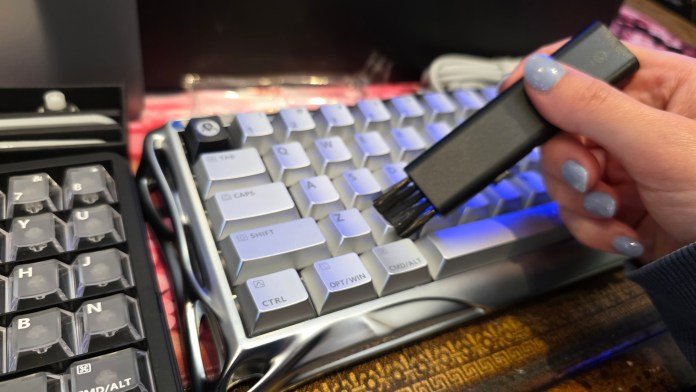
I picked up the box and it literally rattles. Not in a “something’s broken” kind of way, but more like a LEGO set waiting to be unleashed. Inside, there’s a tonne of extras: spare keycaps (including a full set of clear ones), tools, a cable, even a little keyboard duster.

It genuinely feels like opening a gift. It’s the kind of excitement that carries through the whole experience of using this keyboard.

Compact, yet seriously solid
The GravaStar Mercury V60 Pro is a 60% keyboard, and it’s tiny. If you’re coming from a full-size board, the first thing you’ll notice is just how much desk space you suddenly get back. It’s clean, minimal, and perfect for gaming setups.
But don’t let the size fool you. This thing is heavy. And why wouldn’t it be? Its full aluminium frame gives a density you just don’t get from plastic keyboards. It’s got that cold, metallic feel when you touch it, but somehow the finish is still smooth and refined. Flip it over and you’re greeted with a gorgeous brushed metal base that screams premium.

It’s one of those products where the build quality alone makes you feel like you got your money’s worth.
A design that stands out
GravaStar has always leaned into that sci-fi aesthetic, and the Mercury V60 Pro continues that tradition. Between the metallic finish, the stepped key design, and those unique keycaps, it feels like something that belongs in a futuristic cockpit rather than on your desk.

Even the little details are nailed:
- Thick, quality cable with a proper tie for cable management
- Solid construction with zero flex
- Weight that keeps it planted exactly where you put it

This is not a keyboard that slides around mid-game. And I am loving all the RGB lighting. There’s under lights, side lights, and you can even adjust the “indicator light”. One of my favourite things is the cursive “Clutch” writing across the space bar. All nice touches that leave you with a high-quality keyboard that you can tweak to suit your style.

Typing like liquid
Then you start typing on the GravaStar Mercury V60 Pro. The keys are surprisingly soft, with a really smooth travel that feels effortless. There’s a depth to each press that gives it a premium, almost cushioned feel.
And the sound? This is where it really shines.
It’s not loud or obnoxiously clicky. Instead, you get a deeper, more refined tone that’s genuinely satisfying without annoying everyone around you. My colleagues definitely appreciated that… if I still worked in an office that is.

GravaStar’s magnetic switch tech is doing a lot of heavy lifting here, delivering:
- Smooth keystrokes
- Consistent actuation
- A quieter, more controlled typing sound
It’s a great balance between gaming performance and everyday usability.
Small layout, small compromises
Of course, going 60% means compromises. If you’ve read many of my reviews, you’ll know that I love a full-sized keyboard, and a numpad is still a non-negotiable for me.
But who needs a numpad whilst playing games? This 60% keyboard is absolutely perfect for all kinds of gaming. I did notice the arrow keys, shift, and delete are smaller than usual, and there’s definitely an adjustment period. Again, for gaming… this is perfect! But for my productivity, spreadsheets and numbers, the lack of a numpad is noticeable.

No software? No problem
One of my favourite things about GravaStar keyboards is the web-based configuration tool. No downloads. No bloated software. Just plug it in and customise everything through your browser.

You can tweak:
- Actuation points
- Trigger settings and dead zones
- RGB lighting (including per-key and side lighting)
- Macros and custom key mappings
- Lots more
Out of the box, it defaults to a clean, snow-like white lighting effect, which looks fantastic against the metallic finish. But if you want to go full RGB rainbow, it absolutely delivers. No prizes for guessing what mode I put my RGB into.

The verdict
The GravaStar Mercury V60 Pro isn’t trying to be subtle.
It’s bold, heavy, and unapologetically premium. The full metal build gives it a level of durability and presence that’s hard to match, while the magnetic switches deliver a typing experience that’s both smooth and satisfying.
For gamers or anyone who values design and build quality, and if you’re on the lookout for a compact keyboard, the GravaStar Mercury V60 Pro is a seriously compelling option.
If you want a keyboard that feels as good as it looks (and looks like it came from the future), this one absolutely delivers. You’ll need to fork out for it though. The keyboard is a mere $399.99 AUD. But I’d say, it’s definitely one worth saving up for.



















Leave a Comment
Your email address will not be published. Required fields are marked with *