
We all know those setups. Those battle stations that look epic. They have RGB lighting, slick peripherals, and a multitude of charging ports and cables. Not every setup has to cost a fortune, and now that the gamer market is becoming more mainstream, there’s a huge range of accessories and gear out there that isn’t
We all know those setups. Those battle stations that look epic. They have RGB lighting, slick peripherals, and a multitude of charging ports and cables. Not every setup has to cost a fortune, and now that the gamer market is becoming more mainstream, there’s a huge range of accessories and gear out there that isn’t expensive.
Enter 4Gamers. We highlighted some of their recent peripherals, allowing players to purchase high-quality, funky gear at low prices. Now I’m here with a bunch more accessories and tech that can help keep your setup organised, make charging easier, or add a little personality to your desk. I’ve been spending some time with a handful of accessories from 4Gamers, ranging from charging solutions through to desktop lighting, and here’s how they performed.
Desktop Tower Lights
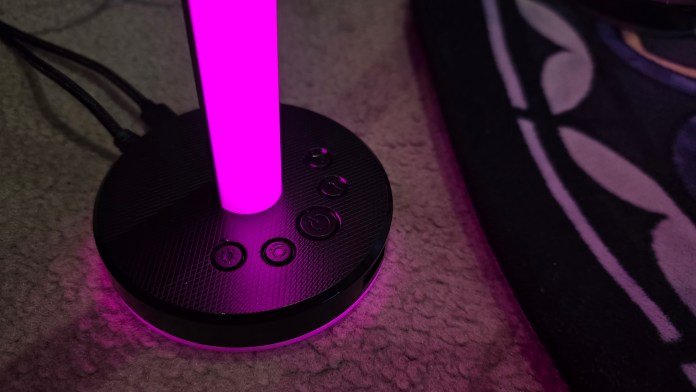
No setup is complete without great RGB lighting. The 4Gamers Desktop Tower Lights are easily the most visually striking accessory in the lineup. Designed as a pair of RGB light towers, they bring ambient lighting to your gaming setup without requiring a complicated installation process.

One of the nicest design touches is that only a single tower needs to be connected to power, with the second linking directly to the first. Power is supplied via USB-A, so there’s no need to sacrifice a power outlet, and the base even includes an additional USB port so you don’t lose a valuable connection on your PC. One tower also includes a removable headphone hook, which slides on and off depending on whether you need it. The non-slip base means your light will stay exactly where you place it.
Best of all, every control is built directly into the stand itself. Brightness, colours, lighting effects, and animation speeds can all be adjusted without installing software or running background applications. For gamers who want to add some atmosphere to their setup while keeping things simple, these lights strike a nice balance between functionality and customisation. And they won’t break the bank. At $59.95 AUD, these lights will add some flair, and you can purchase them from EB Games. If you get in quick, EB Games is running a sale, and you can pick up the lights for $36 AUD.

3M Light Up USB-C Charging Cable
If you’re looking for something a little more fun than a standard charging cable, the 3M Light Up USB-C Charging Cable certainly stands out. The integrated lighting effect runs the full length of the cable, creating a constantly flashing pattern that’s impossible to miss.

The lighting isn’t customisable, which initially had me wondering whether it would change when connected to a device, but it remains consistent regardless of what you’re charging. While that may not suit everyone, it does make the cable incredibly easy to locate in the dark. The USB-A to USB-C connection also makes it versatile enough to work with a wide range of devices, while the cable itself has a soft-touch feel that makes it pleasant to handle. Just be aware that if you prefer a completely dark room, the lighting effect might be a little too enthusiastic. Grab this cable from EB Games, Big W, or Amazon for $19.95 AUD. EB Games has a sale on, and you can purchase the cable for just $15 AUD.
PS5 Vertical Console Stand
The PS5 is already a sizeable console, so giving it a sturdy base is always a good idea. The 4Gamers PS5 Vertical Console Stand helps secure the console in an upright position while also adding some extra USB connectivity, which is something many players will appreciate. The USB cable plugs into the back of the console, so you don’t even need to find extra power for it.

Installation is straightforward. The stand attaches using a screw, although in my case the included screw wasn’t quite long enough to fit with the covers on my console. Swapping it for a slightly longer screw solved the problem immediately and everything fitted securely. Once installed, the stand provides a solid foundation for the console and the additional USB ports are genuinely useful for charging accessories or connecting peripherals. It’s a simple upgrade that helps make better use of the space around your console. The stand is $29.95 AUD, but with the current EB Games sale, you can get it for $23 AUD.

Xbox Twin Play & Charge Kit
Rechargeable battery packs have become an essential accessory for Xbox players, and the 4Gamers Xbox Twin Play & Charge Kit keeps things refreshingly simple. Inside the box are two rechargeable battery packs, allowing you to keep multiple controllers powered up and ready to go.

What I particularly like is that the kit replaces only the battery pack itself rather than requiring a completely new battery door. That means you can keep any customised or limited-edition controller backs you already have fitted. Charging is equally convenient, with USB-C connectivity allowing you to charge the packs while they’re still inside the controller. Simply plug in the cable and you’re good to go. It’s a much cleaner solution than hunting through drawers for older charging cables, and ensures your controllers are always ready for the next gaming session. The kit is just $29.95 AUD, and is available from EB Games and Big W.

PS4 Twin Charging Dock
For anyone still regularly using a PS4, the Twin Charging Dock is one of those accessories that quickly becomes part of your daily routine. The dock supports charging two controllers simultaneously, making it easy to keep both topped up between gaming sessions.

The included braided cable feels durable and offers plenty of length, giving you flexibility when positioning the dock away from the console itself. I also like that it doubles as a display stand. Rather than leaving controllers scattered across a desk or entertainment unit, they remain neatly organised and on show. More importantly, having a dedicated charging location means you’re far less likely to pick up a controller and discover the battery is flat right before you start playing. Similar to the Xbox kit, the 4Gamers Twin Charging Dock comes in at $29.95 AUD, and is available from Big W.
Grab your 4Gamers gear and level up your setup
Overall, this range of accessories focuses on solving everyday gaming setup frustrations rather than reinventing the wheel. Whether it’s keeping controllers charged and organised, adding extra connectivity to your console, making charging cables easier to find, or bringing some customisable RGB lighting to your desk, each product offers a practical benefit at an accessible price point. They’re the kind of additions that quietly improve your gaming experience over time, making your setup a little cleaner, a little more convenient, and a lot more enjoyable to use.



















Leave a Comment
Your email address will not be published. Required fields are marked with *