
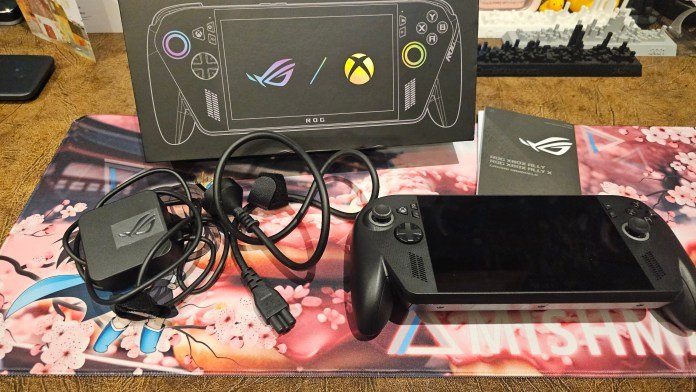
Handheld gaming has come a long way over the past few years. There are tonnes of handheld consoles available these days, yet every now and then a device comes along that makes you stop and say, “wait… that’s actually a full PC?” That’s the reaction I had when I first picked up the ROG Xbox
Handheld gaming has come a long way over the past few years. There are tonnes of handheld consoles available these days, yet every now and then a device comes along that makes you stop and say, “wait… that’s actually a full PC?”
That’s the reaction I had when I first picked up the ROG Xbox Ally X. At first glance it looks like a handheld console. But once you start using it, you realise this thing is something entirely different: a full Windows gaming PC squeezed into a handheld device.
And yes, it’s as cool as it sounds. I was lucky enough to get my hands on one to play over the holidays and I absolutely loved it.

First impressions and setup
If you’re expecting to simply power on the ROG Xbox Ally X and instantly start playing games like a traditional console, you might need a little patience; something I’m not great at.
The first setup process is very similar to setting up a brand new Windows PC. Let’s face it, that’s essentially what the ROG Xbox Ally X is. You’ll go through signing into your account, installing updates, and getting everything ready before you can jump into gaming.

It takes a little while, but once you’re in, everything opens up.
I knew I’d be travelling and wanted to play offline, so the first thing I did was download a game. I went with Hollow Knight: Silksong. Partly because it’s an incredible game, and partly because it’s always great to support Aussie indie developers.

A screen that looks incredible
The first thing that really stands out is the display on the ROG Xbox Ally X.
The Ally X features a 7-inch Full HD (1920×1080) IPS display with a 120Hz refresh rate and up to 500 nits of brightness, and honestly it looks fantastic. The screen is liquid-clear and simply beautiful to look at. Colours pop, motion is smooth, and games look fantastic on the small panel.
Playing something like Hollow Knight on this screen feels perfect. The art style looks crisp and vibrant, and gameplay was smooth. I also tried out Forza Horizon since it pushes the refresh rate with the fast car motion, and it looked great.
For a handheld device, it’s genuinely impressive.
A handheld… that’s actually a full PC
Here’s where the ROG Xbox Ally X gets interesting.
Unlike a traditional console, this device runs Windows 11, which means you’re effectively holding a fully functional PC in your hands. You can:
- Install regular Windows apps
- Use PC game launchers like Steam or Xbox
- Browse the web
- Connect peripherals (yay it has a headphone jack!)
- Or even use it like a tiny desktop computer
If you want a more console-like experience, you can switch into the Xbox full-screen interface, which makes navigating with the controller much easier. But if you exit that mode, you’re right back into a standard Windows desktop.

It’s actually quite funny seeing a Windows desktop running on a handheld gaming console, yet it works surprisingly well.

Controls and hardware
From a design perspective, the ROG Xbox Ally X feels very familiar if you’ve ever used an Xbox controller.
You get the full layout:
- LT / LB and RT / RB triggers
- ABXY buttons
- Dual analogue sticks
- D-pad
- Back buttons on the grips

There are also loads of physical controls on the device itself:
- Volume buttons
- Power button
- Battery indicator
- MicroSD card slot for extra storage
- Headphone jack (which is increasingly rare these days, which is why I’m pointing it out again)
- Two USB-C ports

Under the hood, the ROG Xbox Ally X is powered by the AMD Ryzen AI Z2 Extreme processor paired with 24GB of LPDDR5X RAM and a 1TB NVMe SSD, which is an incredible amount of power for a handheld.
There’s also an 80Wh battery, Wi-Fi 6E, Bluetooth, and Dolby Atmos audio support. In other words: this is not a toy. It’s a serious gaming machine.
Customisation with Armoury Crate
One of the more interesting parts of the experience is the Armoury Crate software.

This is where you can customise almost everything about the device, including:
- Performance profiles
- Control stick behaviour
- Button shortcuts
- Battery settings
- Connectivity
- RGB lighting
Speaking of lighting, the thumbsticks have RGB rings around them.
They look great, and I really love them. Sometimes they randomly turn on until I figured out how to control them properly in Armoury Crate. Once you find the settings you can customise them however you like. Change the colour profiles, or choose to turn it off entirely.

Gaming on a plane
The moment I really fell in love with this device was on a flight. I pulled out the ROG Xbox Ally X mid-flight and the two guys sitting next to me immediately leaned over and asked:
“Woah… what is that?”
I casually replied, “It’s an Xbox handheld console.”
They were immediately impressed.
We all agreed it’s a pretty incredible way to pass the time on a long flight.

I paired my wireless noise-cancelling earbuds to the console and spent hours playing games. Even on a 15-hour flight, it was an incredibly immersive experience. The only time I really noticed a drawback was when I had the whole row to myself on one flight. I was lying down, holding the console above my face while playing. Great idea at the time.
After a few hours… my arms disagreed. At around 715 grams, the ROG Xbox Ally X is fairly heavy for a handheld device.
It’s perfectly comfortable in normal use, but if you’re holding it above your head for extended periods, you’ll definitely feel it.
Is it worth it?
This is where things get interesting.
The ROG Xbox Ally starts at $999 AUD, while the higher-performance ROG Xbox Ally X (the one we’re reviewing here) comes in at $1,799 AUD (yes the price has increased since last year!). Both launched globally late last year and can be purchased through Microsoft Store, ASUS eShop, and participating retailers.
If you think about it purely as a gaming PC, the price actually makes a lot of sense. Most gaming PCs start around $3,000 AUD, so getting this level of performance in a handheld device is impressive.
But if you’re buying it purely as a handheld gaming console, the value proposition changes a bit. There are cheaper handhelds on the market. So it really comes down to what you want.
Choosing between Xbox ROG Ally and Xbox ROG Ally X
If you want the absolute best handheld gaming PC, something that can run PC games, Xbox titles, cloud gaming, and basically anything Windows supports, the ROG Xbox Ally X is one of the best options available. If money isn’t an issue and you want a premium handheld gaming experience, you won’t be disappointed. Both the ROG Xbox Ally and ROG Xbox Ally X have the same display, same operating system, same graphics processor, same controls, same audio, same dimensions, same power supply.
Where they differ is in CPU (AMD Ryzen™ Z2 A Processor 2.8GHz (6MB Cache, up to 3.8 GHz, 4 cores, 8 Threads) for the Xbox ROG Ally, vs. AMD Ryzen™ AI Z2 Extreme Processor 2.0GHz (24MB Cache, up to 5.0GHz, 8 cores, 16 Threads); AMD XDNA™ NPU up to 50TOPS for the Xbox ROG Ally X. What does this really mean? You have much higher processing power on the X version, giving you higher performance and faster gameplay. The other difference is in power, storage, and ports. The X version comes with double the storage, and a larger battery, giving you room for more games, and up to 20 hours longer battery life. Those things can matter when it comes to long hours of gaming on a plane, and it is also the difference between 670 grams (Xbox ROG Ally) and 715 grams (Xbox ROG Ally X).
Final thoughts
The ROG Xbox Ally X is one of the most interesting gaming devices I’ve used in a long time.
It blurs the line between console and PC in a way that actually works. You get the portability of a handheld device, the familiarity of Xbox controls, and the full power and flexibility of Windows gaming.
It’s not necessarily perfect, depending on your definition of perfect. It’s heavy, expensive, and still carries some of the quirks that come with running Windows on a handheld.
But if you’ve ever wanted to take your entire gaming library with you on a plane, on a train, or anywhere else, this is about as close as we’ve gotten to that dream. And honestly, it’s pretty incredible.



















Leave a Comment
Your email address will not be published. Required fields are marked with *