
Microsoft has a habit of changing things that aren’t broken, but it looks like they are finally ready to admit a mistake. When Windows 11 launched, one of the biggest points of friction was the locked taskbar. For decades, we had the freedom to pin that bar to the top, left, or right of our
Microsoft has a habit of changing things that aren’t broken, but it looks like they are finally ready to admit a mistake. When Windows 11 launched, one of the biggest points of friction was the locked taskbar.
For decades, we had the freedom to pin that bar to the top, left, or right of our screens. Windows 11 took that away, forcing everyone into a bottom-only layout that felt like a step backward for desktop customisation.
In a significant update to the Windows Insider program, Microsoft has confirmed that the ability to move the taskbar is making a triumphant return. It is a massive win for those who have spent years asking for their vertical screen real estate back.
The return of the vertical taskbar
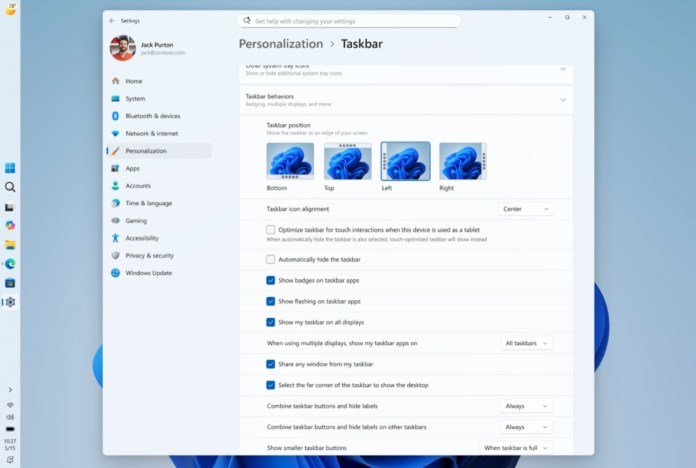
The announcement came via the Windows Insider Blog, detailing a new focus on personalising the core Windows experience. The headline feature is undoubtedly the flexibility to position the taskbar on any edge of the screen.
Insiders in the Experimental channel can now place the taskbar at the top, bottom, left, or right. This isn’t just a cosmetic change; it fundamentally alters how the OS handles desktop space on modern displays.
For many professionals, especially those using ultra-wide monitors, side-mounted taskbars are essential. It allows for more vertical room for code, documents, and web browsing without losing access to open apps.
Customisation beyond just placement
The update doesn’t stop at just moving the bar from the bottom to the side. Microsoft is introducing granular control over how icons and menus behave once you move the taskbar.
You can now choose icon alignment for every position, such as top-aligned or centred when the bar is on the left or right. This level of control ensures the UI feels intentional rather than just a hacky workaround.
Crucially, the flyouts for Start and Search now respect the taskbar’s location. If your bar is at the top of the screen, the Start menu will now drop down from the top, maintaining a logical flow for the user.
A smaller taskbar for smaller screens
Another major addition is the return of the “small taskbar” option. Windows 11 initially introduced a taller, roomier taskbar to improve touch targets, but this often felt cramped on laptops and tablets.
The new “Show smaller taskbar buttons” setting allows for a shorter bar and smaller icons. This is a welcome change for users who want to maximise every single pixel of their workspace.
Switching between these sizes no longer requires a restart or signing out of your account. It is a seamless toggle that reflects Microsoft’s new commitment to a more agile and responsive user interface.

Cleaning up the Start menu
Alongside the taskbar changes, the Start menu is getting a much-needed overhaul to reduce clutter. Microsoft is moving away from the forced “Recommended” section that many users found intrusive.
New section-level toggles allow you to independently show or hide Pinned apps, Recommended items, and the All Apps list. This means you can finally have a minimal “pins only” Start menu if that is your preference.
The “Recommended” section is also being renamed to “Recent” to better reflect its actual utility. It will focus on recently installed apps and used files, with improved relevancy algorithms to keep things useful.
A commitment to user feedback
This update feels like a direct response to the community feedback that has been building since 2021. It signals a shift in Microsoft’s philosophy toward listening to its most loyal power users.
“The ability to move the taskbar to the top or sides of the screen has been one of the most requested features, and we are bringing it to Windows 11.”
Diego Baca, Partner Director of Product Management, Microsoft.
By addressing these long-standing complaints, Microsoft is earning back trust. It shows they are willing to iterate on the “craft” of the operating system rather than just chasing new AI features.
Technical limitations and what’s next
While the core functionality is back, there are still a few things Microsoft is working on. Features like auto-hide and tablet-optimised layouts aren’t yet supported in the alternate taskbar positions.
Search boxes are also currently limited to a simple icon when the taskbar is moved. Microsoft has indicated that they are still evaluating how to handle drag-and-drop and per-monitor taskbar positions.
The goal is to deliver a simple and predictable experience that avoids accidental movement. We expect these remaining “polish” items to be addressed as the build moves through the various Insider channels.
How to get the update now
If you can’t wait to move your taskbar, you can opt into the Windows Insider Program via your system settings. Be warned that the Experimental channel is for testing and may not be suitable for your daily driver.
For the rest of us, it is just a matter of waiting for the official update to land in Australia. It is a refreshing change to see Windows becoming more “personal” again after years of rigid layouts.
I’ll be keeping a close eye on the performance of these builds. As soon as this hits the stable channel, my taskbar is going straight to the top of my monitor, where it belongs.
For more information, head to https://www.microsoft.com/en-au/windows/windows-11


















Leave a Comment
Your email address will not be published. Required fields are marked with *