

When you think about lightweight wireless gaming mice, the market usually pushes you toward minimalism. Companies strip out features, ditch RGB, and expect you to manage settings through bloated desktop software or decipher flashing LEDs just to figure out your battery level. Epomaker takes a completely different route with the Epomaker Nex Lite. Instead of
When you think about lightweight wireless gaming mice, the market usually pushes you toward minimalism. Companies strip out features, ditch RGB, and expect you to manage settings through bloated desktop software or decipher flashing LEDs just to figure out your battery level.
Epomaker takes a completely different route with the Epomaker Nex Lite. Instead of stripping down to the bare essentials, they’ve managed to include built-in screens, bundled an RGB magnetic charging dock, and kept the weight down so low it barely feels like there’s anything in your hand. All this at a price point that undercuts most mainstream alternatives. Let’s take a look.
Out of the box, the first thing that hits you is the weight, or rather, the complete lack of it. It glides effortlessly across the desk, making fast flicks and long work sessions completely fatigue-free. Epomaker thoughtfully includes extra skates right in the packaging, so you’re covered down the road when wear and tear kick in.
Visually, the Nex Lite leans into a clean, modern aesthetic. I opted for the soft, subtle pink mouse colour that complements my pastel pink desk setup and pairs naturally with Epomaker’s mechanical keyboards, which you’ve seen us review the HE108, the QK108, and TH108 V2 Pro.
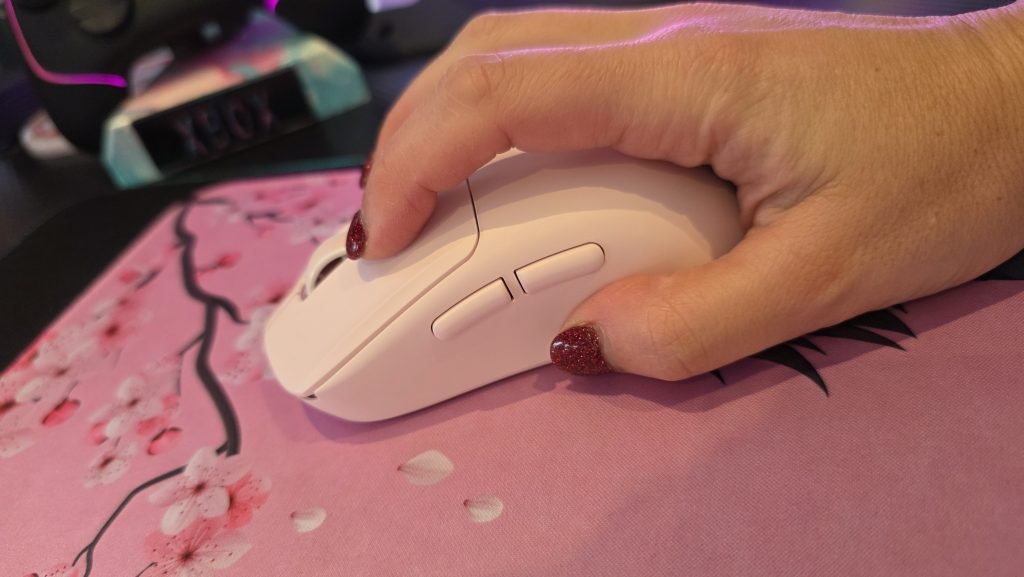
The lighting execution is particularly clever. Rather than slapping bright, distracting LEDs on the palm rest, Epomaker opted for unassuming RGB accent strips tucked underneath the mouse. It creates a subtle underglow on your pad that looks premium rather than obnoxious. The scroll wheel has a tactile, controlled step to it, and both primary switches deliver an immediate, crisp, and very satisfying click sound without feeling hollow.
Yes, there’s an OLED screen ON the mouse
The standout party trick here is something you rarely see on a mouse, let alone one designed to be lightweight: a built-in LCD display… oh wait, that’s not LCD, it’s actually OLED! And not just one, but two. There’s a screen on the mouse itself, and on the charging dock.
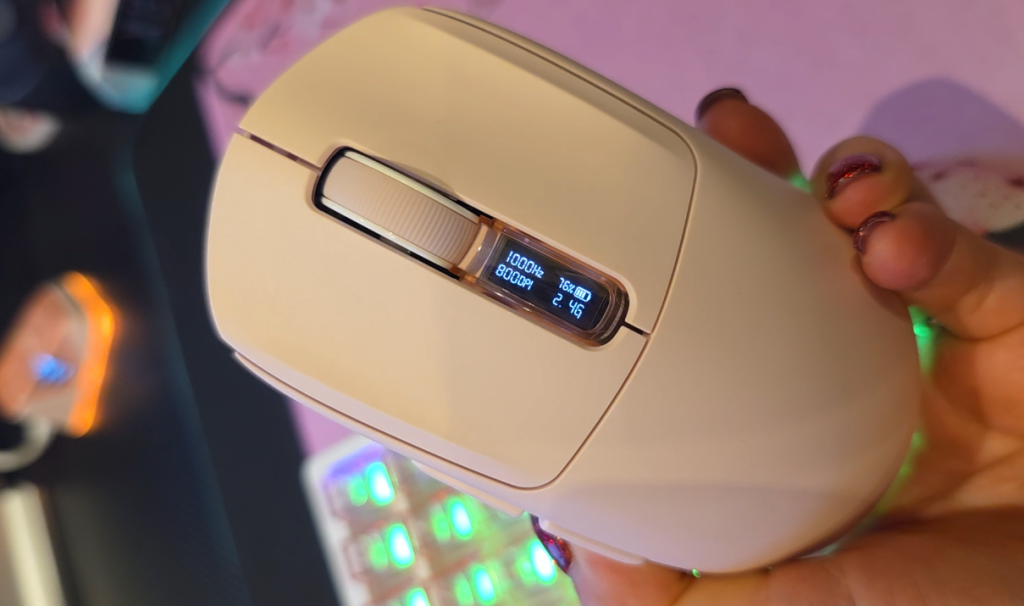
How Epomaker managed to fit a functional screen into the mouse chassis without turning it into a heavy brick is genuinely impressive. Glancing down at the mouse gives you immediate, real-time readouts:
- Current battery percentage
- Active connectivity mode (2.4GHz, Bluetooth, or Wired)
- Polling rate
- Current DPI level
You also have these same readouts on the charging dock.
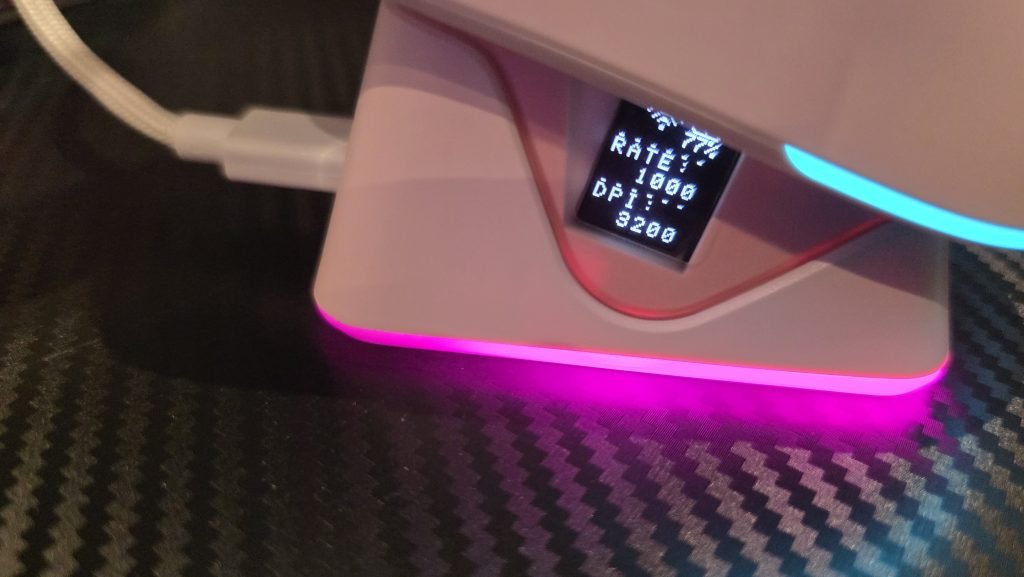
This completely eliminates the biggest frustration of budget wireless gear: the guesswork. You don’t have to wait for a battery light to flash red mid-match, and you don’t need a clunky desktop software suite running in the background consuming system resources just to check your status. Everything you need to know is visible right on the peripheral.
Performance and on-the-fly control
Underneath the Epomaker Nex Lite, you’ll find a switch to flick between various connectivity modes, and you can program any of the five buttons to adjust DPI, remap, and choose how you want your mouse to perform. Cycle through DPI stages, scaling from a controlled 400 DPI all the way up to an ultra-sensitive 12,000 DPI. At the higher end, tracking is blindingly fast—almost hard to keep up with visually—making it capable of handling fast-twitch shooters or multi-monitor workstation setups. I also love that Epomaker uses web-based software so you don’t need to install anything to configure your mouse.

Because all the critical stats cycle on the integrated screen, the entire configuration process is standalone. You change your DPI, glance at the display to confirm your setting, and get straight back to gaming or working.
Connectivity and the charging dock
Versatility is central to the Epomaker Nex Lite’s appeal, offering three distinct modes of connectivity:
- 2.4GHz Wireless – Low-latency connection via the included USB receiver for fast-paced gaming
- Bluetooth – Quick pairing for laptops, tablets, or secondary productivity machines
- Wired (USB-C) – Plug straight in with the charging cable while you top up the battery
The included charging dock is an unexpected luxury at this price point. Instead of fumbling around with loose USB cables whenever the battery dips, you simply drop the mouse onto the magnetic cradle at the end of the day. The dock features its own matching RGB ambient ring around the base, effectively doubling as an attractive desk accessory while ensuring the mouse is always topped up and ready to go.

What’s in the box?
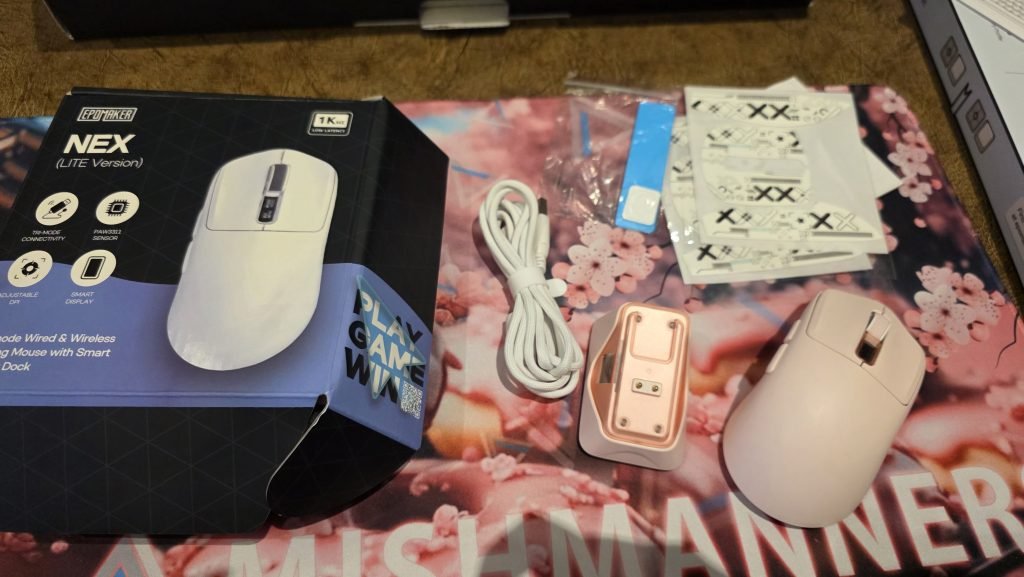
Epomaker didn’t cut corners with the bundle. Inside, you get:
- Epomaker Nex Lite wireless mouse
- Magnetic RGB charging dock
- USB-C charging / data cable
- 2.4GHz wireless dongle
- Replacement mouse skates / PTFE feet
- User documentation
Price and availability
The Epomaker Nex Lite punches well above its weight class. Delivering a sub-featherweight chassis alongside tri-mode connectivity is solid on its own, but packaging it with on-device OLED screens and a dedicated RGB charging dock makes it one of the most versatile and value-packed peripherals available in the budget bracket.
If you want a lightweight daily driver that skips the software bloat and looks great on your desk, the Nex Lite deserves a close look.
You can choose between Black, Blue, Pink, and White mouse colours, and the mouse is just $45 AUD (currently down from $53 AUD). You can buy it directly from the Epomaker website. If I didn’t have such a pink desk setup, I’d be opting for the gorgeous blue colour. Note that this mouse is currently only immediately available in pink, with the other colours ready for preorder.
Check back often for more exciting news!