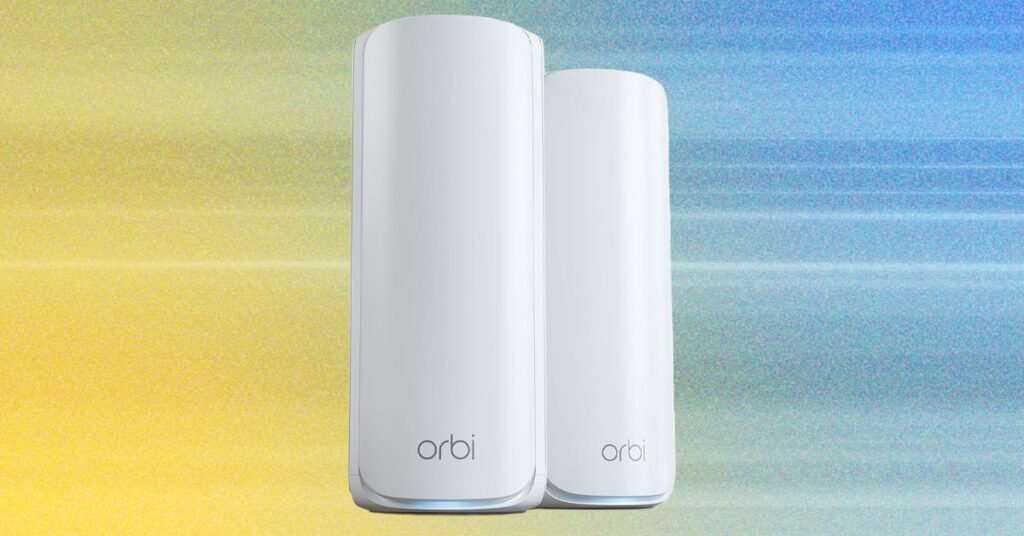
These towering routers aren’t quite as big as the far more expensive Orbi 970 Series, but they have a similar design and are relatively large. The main router has four 2.5 Gbps Ethernet ports, while the satellites make do with two 2.5 Gbps ports apiece. There’s no USB. Setup is quick and easy using the
These towering routers aren’t quite as big as the far more expensive Orbi 970 Series, but they have a similar design and are relatively large. The main router has four 2.5 Gbps Ethernet ports, while the satellites make do with two 2.5 Gbps ports apiece. There’s no USB. Setup is quick and easy using the Orbi app on your phone.
It is a tri-band system, and by default, there is one network name (SSID) for the 2.4-GHz, 5-GHz, and 6-GHz bands, and it supports multi-link operation (MLO). MLO is a new Wi-Fi 7 feature that allows devices to connect on multiple bands simultaneously. While a single SSID simplifies things, MLO can cause problems for legacy devices because Wi-Fi 7 has more stringent security requirements (WPA2 or higher). Something like an iPhone 5 won’t be able to connect, though you could potentially use a guest or IoT network.
Wi-Fi 7 also enables wider channels (up to 320 MHz from the current high of 160 MHz) and a handful of other improvements. You can expect consistently fast Wi-Fi and excellent coverage from this system (Netgear optimistically suggests up to 8,000 square feet for a three-pack). I found it fast and stable, and it had no issues covering my home. While it is slower than some other systems I tested, you are unlikely to notice the difference in everyday use unless you are constantly transferring large files.
The Orbi 770 offers more than enough bandwidth for multiple people in the household to be streaming and gaming simultaneously. There’s potential for stable, low-latency, multi-gigabit speeds if you have Wi-Fi 7 devices connected to the main router, but I occasionally encountered a touch of lag with the satellites. If you can run Ethernet cables for wired backhaul, you can eliminate that.
The Orbi app is straightforward and shows connected clients, enables you to check your internet speed, and has a few other settings. You get 30-day trials of Netgear’s Armor security software (powered by Bitdefender) and Smart Parental Controls, but after that, Armor (phishing and malware protection, device and network scanning) costs $40 for the first year, then jumps to $100, and the parental controls (profiles, age-appropriate filters, scheduling, and time limits) are $8 per month. You don’t need either of these pricey subscriptions.
Unless you have a large home and a multi-gig internet connection (over 2.5 Gbps), this mesh is likely to be indistinguishable from more expensive mesh systems, like the TP-Link Deco BE85 ($1,200), Eero Max 7 ($1,700), and Netgear Orbi 970 Series ($2,000). In my previous modern home, I rarely noticed the enhanced performance of the much pricier 970 over the 770, and a two-pack will more than suffice for most folks. If your internet connection is faster than 2.5 Gbps, consider the excellent Netgear Orbi 870 (3-Pack) at $1,300. Watch out for frequent discounts on all of these systems.
Best Subscription-Free Mesh
This Wi-Fi 7 mesh system topped nearly all of my tests, delivering strong coverage and impressive throughput. It is a tri-band system (2.4 GHz, 5 GHz, and 6 GHz ) that uses MLO for a reliable wireless backhaul between the main router and mesh node. While I originally tested a two-pack in a modern, 1,600-square-foot home, the BT10 recently proved powerful enough for my challenging old Victorian house, which features thick stone walls and dampening rubble between the floors. Each unit also includes two 10-Gbps Ethernet ports, one Gigabit port, and a USB 3.0 port.
{For more tech updates, stay tuned to our blog.|Keep following us for the latest insights.|Check back often for more exciting news!}