
The more I try out all different kinds of keyboards, the more I realise I’m becoming incredibly picky. I want a detachable cable. I want a keyboard that feels great to type on. I want customisation options. I want RGB lighting. And despite the popularity of compact layouts, I still really appreciate a full-size keyboard
The more I try out all different kinds of keyboards, the more I realise I’m becoming incredibly picky. I want a detachable cable. I want a keyboard that feels great to type on. I want customisation options. I want RGB lighting. And despite the popularity of compact layouts, I still really appreciate a full-size keyboard with a numpad.
The Epomaker QK108 ticks all of those boxes and then throws in a custom LCD screen and programmable knob for good measure. This is a keyboard that feels like it was designed by people who know their audience. If you’re a developer, someone who spends all day in terminals and IDEs, or simply love tweaking every aspect of your setup, there’s a lot to like here.
Full-size and unapologetically so
The Epomaker QK108 keyboard uses a full 104-key layout. That means you get your function row, navigation keys, arrow cluster, and yes, the numpad. As someone who spends a lot of time writing, editing, and bouncing between applications, I still appreciate having every key available. I know smaller keyboards are all the rage right now, but there’s something comforting about a full-size layout that just works.
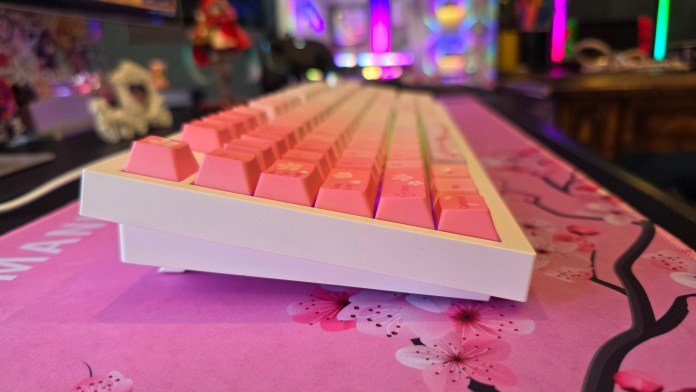
The keyboard also features a stepped design, with the keys sitting higher at the back. Combined with the adjustable feet, you can choose the perfect height to suit your typing needs.

Detachable cables should be everywhere
This is becoming one of my favourite features on keyboards. The Epomaker QK108 uses a detachable USB-A to USB-C cable, which makes plugging it into different machines incredibly easy. No awkward cable routing and no permanently attached wires.
The keyboard also supports both Bluetooth and 2.4GHz wireless connectivity, but I still prefer running it wired. Partly because I forget to charge things, and partly because wired still feels like the most responsive option. There’s far less latency, and no fiddling around with various wireless connectivity options. Plug it in and get to work.
Quiet, soft, and surprisingly satisfying, with hot swappable switches
The keyboard I tested came with silent switches, and they’ve been fantastic. Although I do miss the clicky-clacky keys, and this is where one of the coolest features of the keyboard comes in. Whilst the typing experience is soft and cushioned thanks to the gasket-mounted design and internal sound dampening on the Epomaker Sea Salt Silent Switches, you can easily swap out the switches if you prefer something different. I purchased a set of Epomaker Creamy Jade Switches, and the hot swapping was super easy. The keyboard comes with a keycap puller which made hot swapping a breeze. No need to solder anything. If you’re someone who likes experimenting with different switch types, the Epomaker QK108 gives you plenty of room to grow.

The keyboard I have comes with the pink cherry blossom keycaps. You can also purchase the Epomaker QK108 in the “grey white green” colour, which reminds me of the old keyboards from the 90s. Epomaker also has a huge range of keycaps on their website, giving you options for everything from pastels to blacks, golds, rainbow, and more. Keycaps start from $29.49 AUD. There are also fun novelty keycaps that feature cats, emojis, sunflowers, and more. You’re sure to find something you’ll like.

The LCD screen is a novelty… and I love it
Do I need a custom LCD screen on my keyboard? Absolutely not. Do I want one? Apparently, yes
The little display is surprisingly fun. Out of the box, mine was convinced it was living in the year 2000, so you’ll probably want to spend a few minutes setting things up.

Thankfully, Epomaker’s image tool is web-based, which means there’s no software installation required. Open the webpage, connect the keyboard, sync the time, and you’re good to go.

The screen can also display custom GIFs. You can upload three of them to the keyboard and cycle through them using Fn + Enter. I will admit this wasn’t particularly intuitive. I re-uploaded images several times before figuring out how to actually switch between them. Once I worked it out, though, it became a lot of fun.

I ended up keeping just a single GIF loaded, and that’s probably all I need.
A volume knob that actually feels useful
The programmable knob sits beside the LCD display and immediately became something I used more than expected. On the Epomaker QK108, the knob by default adjusts volume when turning it, whilst pressing it mutes and unmutes audio.
It’s simple, but having physical volume control on your keyboard is one of those quality-of-life features that quickly becomes difficult to live without.
A keyboard that speaks developer
This might be my favourite thing about the Epomaker QK108. A lot of manufacturers throw around terms like “for creators” or “for professionals”. Epomaker actually leans into customisation in a way that feels genuinely developer-friendly.
The keyboard supports VIA and QMK, which means you can completely remap keys, create custom layers, and configure functions to suit your workflow. Getting everything running does require a couple of extra steps.
You’ll need to load the keyboard’s JSON file into VIA, which you can do by enabling the developer option which is called the “Design Tab”, go to the Design Tab, upload the *.json file, aand authorise the keyboard connection. It’s not quite plug-and-play, but once you’re in, you have access to an enormous amount of configuration.

If you’re the kind of person who loves custom shortcuts, macros, or remapping keys for your development environment, you’ll probably have a great time here. The good news is you don’t have to do any of this.
Most people can happily use the keyboard straight out of the box.
RGB without the software headache
I’m also a big fan of the lighting implementation. You can customise brightness, colours, and effects entirely using onboard keyboard shortcuts. The VIA software allows you to customise a lot of the lighting options. Whilst there’s a lot here to customise, the downside is you can only customise all the effects and speed against one colour.

If you don’t want to do any work customising, getting the VIA software working, and you want access to more colours, the keyboard shortcuts are perfect for making your lighting unique, without requiring any software at all. You can achieve lots of customisation just by using keyboard shortcuts. Here are the keyboard shortcuts for some of the top functions you’ll need:
- Fn + |: cycle through backlight colours/effects
- Fn + Up Arrow: Increase backlight brightness
- Fn + Down Arrow: Decrease backlight brightness
- Fn + -_: Decrease backlight effect speed
- Fn + =+: Increase backlight effect speed
There’s also a dedicated key next to the LCD screen that toggles the backlighting on/off.
The downside is that cycling through effects can be a little tedious because you need to work through everything sequentially.
The upside? No software installation. No accounts. No background processes. No remembering which computer has the keyboard software installed.
You can change the lighting from any machine you happen to plug the keyboard into, and I really appreciate that simplicity.
Final thoughts
The Epomaker QK108 feels like a keyboard built for people who genuinely enjoy their peripherals. The Epomaker QK108 keyboard is $89.99 USD ($128.24 AUD) and is available on the Epomaker website. The price is on par with many other keyboards on the market, and there are so many features here that I love. The full-size layout is practical, the typing experience is fantastic, the hot-swappable switches make it easy to experiment, and the little LCD screen adds an unexpected amount of personality to your setup.
Then there are all the developer-focused touches. VIA support, QMK compatibility, onboard controls, web-based configuration tools, and enough customisation to keep tinkerers busy for quite a while. Do you need a custom GIF playing on your keyboard while you’re writing code? Probably not.
But after using the Epomaker QK108 for a while, I completely understand why you’d want one.




















Leave a Comment
Your email address will not be published. Required fields are marked with *