
The demands on our desktop workspaces have intensified significantly, with many home offices requiring multiple laptops to dock at a workstation, or even having peripherals work across setups like desktop and laptop. When we are working, our technical needs change. With today’s peripherals delivering faster data transmission, you need all pieces in the chain to
The demands on our desktop workspaces have intensified significantly, with many home offices requiring multiple laptops to dock at a workstation, or even having peripherals work across setups like desktop and laptop.
When we are working, our technical needs change. With today’s peripherals delivering faster data transmission, you need all pieces in the chain to support the highest speeds to take maximum advantage.
Hardware company StarTech has addressed this directly with its next-generation Driverless Multi-Stream Transport (MST) USB-C Docking Stations. These docks aim to remove the friction of hardware deployment by allowing users to connect an array of high-performance peripherals through a single cable.
If you’re looking to finally tidy up your desk for that professional-looking clutter-free home office, then you’re in luck. It serves as a central connectivity hub, routing video, network and data streams simultaneously while keeping your machine powered.
The target audience centres squarely on business, enterprise and enthusiasts who operate on mixed hardware platforms. This dock makes it super simple to connect a single USB-C cable and have your devices and displays just work. While home users can certainly take advantage of this, it also highly appeals to shared office spaces or educational environments where a constant rotation of hot-desking users requires immediate plug-and-play reliability.
Design
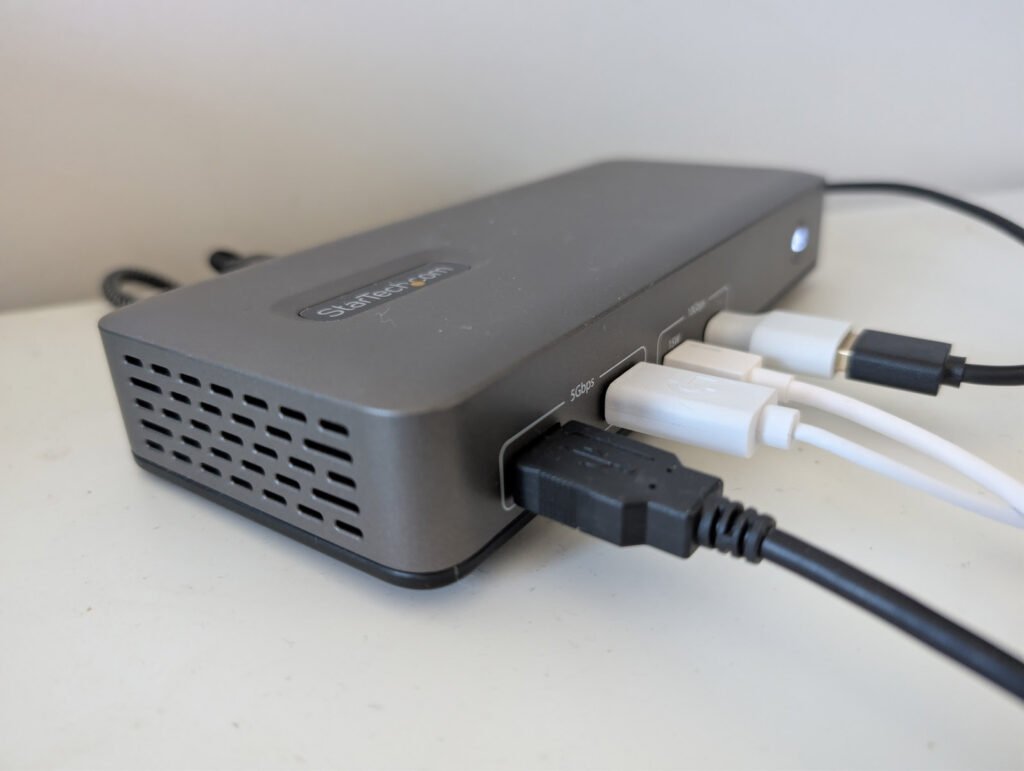
The unit presents a functional, utilitarian aesthetic that prioritises durability and workspace integration over flashy design language. If you wnat RGB lights in your dock, look elsewhere, as these are wrapped in a ruggedised, matte grey chassis, and firmly resists fingerprints.
StarTech has thoughtfully included an integrated security lock slot and a mountable layout, allowing IT departments to cleanly secure the hardware beneath desks or onto monitor arms.
Something that’s hard to miss is the VGA-style pins that screw in, but this time on the highest power port, the 100W to ensure your connection remains stable and isn’t easily knocked.
When compared to older generations and consumer-grade competitors, the structural design feels much more geared toward long-term commercial deployments. Many standard hubs suffer from short, fixed host cables that force the dock to dangle awkwardly from a laptop port. This model avoids that limitation by providing ample cable length and a robust port distribution layout that keeps thicker, permanent display cords positioned neatly at the rear.
What works exceptionally well is the logical grouping of inputs, leaving high-speed data paths easily accessible at the front while keeping infrastructure lines tucked away. If there is a minor downside to the physical footprint, it is that the housing remains slightly larger than minimalist travel hubs due to its heavy-duty internal power architecture. However, this trade-off is entirely justified given the power delivery and thermal management it provides during sustained data loads.

Performance
Operating this hardware over an extended period reveals a highly stable experience that handles heavy data loads without stuttering or disconnects. Testing the unit with multi-monitor configurations proves the efficiency of the integrated technology, maintaining clean, flicker-free outputs across multiple screens. It drives dual displays at full 4K resolution at 60Hz with absolute stability, avoiding the drop in refresh rates that often plagues lesser hardware.
It is a shame that we don’t see support for higher refresh rates; however, those are typically more aligned with gaming than professional document writers. The display connections include 2x Display Ports and 1x HDMI.
For those who want to push the maximum number of pixels, it supports Dual 4K 60Hz + one 4K 30Hz with the triple display dock.
Data transfers across the high-speed paths remain consistently close to theoretical maximums, even when utilising multiple connected peripherals simultaneously. Moving large asset files, video projects, and massive databases across the 10Gbps USB ports shows excellent sustained throughput without heat throttling. The Gigabit Ethernet port handles full line rate local network traffic, providing low-latency connections that are vital for secure enterprise environments.
Power delivery performance is another standout metric, offering up to 100W of charging capacity directly through the upstream host connection. This provides more than enough juice to keep power-hungry workstations and modern AI-enabled PCs fully charged under maximum processing loads. Crucially, the dock manages this energy distribution silently, avoiding high-pitched coil whine or excessive heat generation during lengthy multi-hour work sessions.
Features
StarTech has packed this hardware with enterprise-grade capabilities designed to streamline deployment across massive corporate fleets while maximising individual desktop utility.
Driverless deployment
The system utilises native Windows support to allow immediate plug-and-play operation across Intel, AMD, and Snapdragon platforms without installing software.
Multi-Stream Transport video output
The advanced display engine drives up to two 4K displays at 60Hz or three distinct displays simultaneously to maximise desktop screen real estate.
Ten Gigabit per second data paths
High-speed USB Type C and Type A peripheral ports allow rapid file transfers and seamless connections to external solid-state storage drives.
One hundred-watt power delivery
The integrated power management system charges connected laptops directly through the primary host cable to eliminate the need for a separate manufacturer’s charger.
Flexible mounting options
The docking stations include screw holes on the bottom for easy desk, wall or VESA mounting. This allows the dock to be positioned on the back of the display (with adapter), perfect for deployment in large offices, hot desks or hoteling environments.
Issues and opportunities
While there is a massive amount to love about the stability and build quality of this unit, no piece of hardware is completely perfect. The most obvious limitation during daily use is the overall count of available USB ports on the chassis. Power users with a massive array of legacy accessories, desktop audio gear, and local storage keys will likely find themselves wishing for more physical Type A connections.
Another clear area of opportunity for future premium iterations would be the integration of a hardware-based keyboard, video, and mouse (KVM) switch. An integrated KVM feature, as they have in other models, would allow creators and technical professionals to easily share their multi-monitor setup between a corporate laptop and a personal desktop system. Adding this capability alongside an expanded port selection would elevate this great device into an absolute all-in-one command centre.
Price and availability
The StarTech Multi Stream Transport docking station line is available across Australia through a variety of commercial IT channels and consumer electronics retailers. Buyers can source the hardware immediately from established technology vendors with full local warranty support.
StarTech offer a number of docks from their website:
You can expect to pay between $300 and $800 depending on the specific model and features you select.
For more information, check out StarTech.
Overall
This docking station delivers an exceptionally reliable, enterprise-grade solution to the messy problem of modern desktop cable management. By removing the need for third-party display drivers, StarTech has created a genuinely seamless plug-and-play environment that performs consistently across different CPU architectures. It completely eliminates the setup headache that traditionally plagues multi-screen Windows workspaces.
The hardware most strongly appeals to corporate IT looking to standardise deployment across a varied fleet, as well as remote professionals who demand rock-solid reliability. It represents excellent value for money when you factor in the time saved on troubleshooting and the premium 100W power delivery output.
If you need a high-performance, trouble-free hub to anchor an intensive daily workflow, this product is absolutely worth the investment.
















Leave a Comment
Your email address will not be published. Required fields are marked with *