
Wi-Fi 7 is the newest home networking standard. It promises faster speeds, better reliability, and the ability to handle more devices at once. I tested several Wi-Fi 7 mesh systems to see if they lived up to the hype. They didn’t. At least, not for my house. I’m not going to name the specific brands
Wi-Fi 7 is the newest home networking standard. It promises faster speeds, better reliability, and the ability to handle more devices at once. I tested several Wi-Fi 7 mesh systems to see if they lived up to the hype. They didn’t. At least, not for my house.
I’m not going to name the specific brands I tested. That’s because what I ran into isn’t a problem with any one company. It’s a problem with how Wi-Fi 7 mesh systems are designed.
The promised future that didn’t quite arrive
Wi-Fi 7 is supposed to work with older devices. That’s the whole idea of backward compatibility. In practice, a lot of older smart home devices struggle badly with these newer systems.
Wi-Fi 7’s big selling point is a feature called Multi-Link Operation, or MLO. It lets a device connect across multiple frequency bands at the same time, with the idea of lowering lag and handling congestion better. On paper it sounds great. In a house full of mixed devices, it creates real problems.
The reason comes down to how Wi-Fi 7 mesh networks handle their different frequency bands. Most systems combine the 2.4GHz, 5GHz, and 6GHz bands under a single network name. The router then tries to decide, automatically, which band to put each device on. The idea is that you never have to think about it. The system figures it out for you.
Older smart home devices don’t play well with this. Many of them only know how to connect to 2.4GHz. When a router uses a single name for all its bands, these devices can become confused or try to connect on a band they don’t support, causing the setup to fail or the connection to drop.
That’s what happened in my house. Several of my 2.4GHz smart devices dropped offline for parts of the day. They only came back after a reboot, sometimes more than once.
Need For Speed?
You’re unlikely to notice a difference jumping up from Wi-Fi 6/6e to 7 if:
- Your NBN plan is well below gigabit speed eg a 250/100 Mbit connection like mine simply can’t take advantage of Wi‑Fi 7’s multi‑gigabit wireless capacity.
- You don’t transfer large files within your home Wi‑Fi 7 shines when you’re moving gigabytes between devices – video editing from a NAS, backing up large photo libraries, or streaming high‑bitrate local media. If you mostly stream from the internet, browse, and use cloud services, Wi‑Fi 6/6E already handles this effortlessly.
- Your current Wi‑Fi setup is stable and covers the whole home If you’re not battling dead zones, congestion, or dropouts, upgrading won’t magically improve an already‑good experience. A reliable Wi‑Fi 6 or 6E mesh can deliver consistent speeds that fully saturate sub‑gigabit NBN plans.
I’m not the only one
This isn’t just my experience. It’s a well-documented problem that’s showing up across forums and tech sites.
XDA Developers pointed out that most smart home IoT devices still use 2.4GHz, but even those that use 5GHz aren’t built to meet Wi-Fi 7’s requirements. The article noted it’s unreasonable to expect anyone to replace their entire smart home just because they upgraded their router, yet that’s essentially what networking manufacturers seem to expect.
XDA also noted that the official advice from router makers like Asus for dealing with compatibility problems includes disabling Wi-Fi 7 mode, turning MLO off, or changing the security settings. All of those fixes effectively turn your Wi-Fi 7 router into a Wi-Fi 6 one. You’re paying for the latest technology and then disabling it to make your home actually work.
TP-Link, one of the biggest router brands in the world, has acknowledged the issue directly. The company noted in its own community forums that “We’ve recently noticed from community feedback that Wi-Fi 7 routers may cause connectivity issues with certain smart devices, leading to compatibility problems. These issues can prevent smart devices from connecting to the main Wi-Fi network of a Wi-Fi 7 router.”
Their suggested fix? Turn off advanced features like 6GHz Wi-Fi, Multi-Link Operation, roaming, and mesh networking. Again, that’s paying for a Wi-Fi 7 system and then switching off the key features.
Netgear ran into the same issue with its Orbi Wi-Fi 7 systems. Its support documentation states that Orbi and Nighthawk Wi-Fi 7 routers use WPA2 and WPA3 security by default, but that some devices including printers, smart home gadgets, and older devices are not compatible with this level of encryption and need to connect to a network with a lower level of security instead.
My smart home has a lot of older gear
The devices in my house that need Wi-Fi range from a few months old to more than five years old. That’s a pretty wide spread.
Some things like my hot water system, air conditioners, and home battery system, only work on 2.4GHz. That’s the oldest and slowest of the Wi-Fi bands. It’s also the one with the best range and the best ability to get through walls. For devices that sit in a fixed spot and just need a stable, steady connection, it does the job fine.
Wi-Fi 7’s smarter approach to managing connections works well for phones and laptops that can handle being switched between bands. For devices that are bolted to a wall and only speak 2.4GHz, it’s a problem.
“Just replace those old devices” isn’t a real answer
I know what some people will say. If those older devices are causing problems, why not replace them with newer ones that support modern Wi-Fi?
It’s a fair question. Here’s the practical answer: some of these devices cost hundreds or even thousands of dollars. A home battery system. 5 air conditioners. A smart hot water heat pump. These aren’t gadgets you swap out because your router doesn’t like them. They’re appliances that will be in the house for five to ten years or more. Replacing them just to satisfy a new router would be expensive and wasteful.
Even if you were willing to spend that money, you still couldn’t, because smart home device makers often aren’t building devices with Wi-Fi 7 support. Most are barely up to Wi-Fi 4 or 5.
Going back to Wi-Fi 6
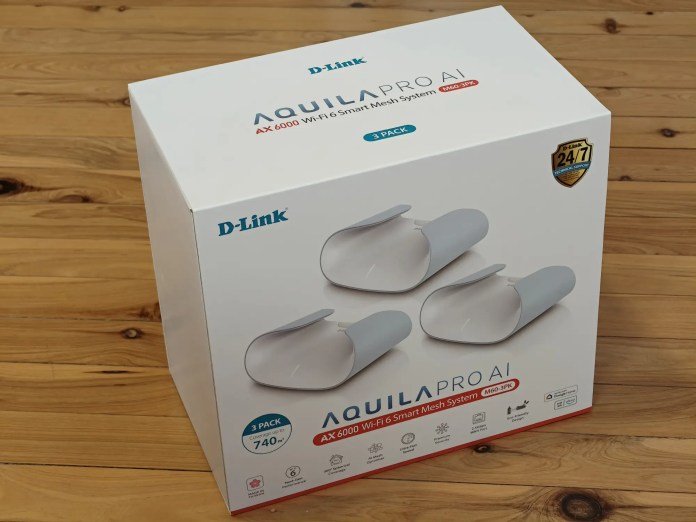
After testing several Wi-Fi 7 systems and running into the same issues each time, I made a decision. I swapped back to a Wi-Fi 6 mesh system. Specifically, the D-Link Aquila Pro AI M60, a three-pack that claims to cover up to 740 square metres.
I chose the M60 because my parents have been using the older D-link Aquila M30 mesh Wi-Fi system for several years and it has worked fine for all their devices old and new.


It keeps the 2.4GHz and 5GHz bands manageable enough that my older devices stay connected without being shuffled around by a system trying to be too clever. The smart home gear that had been dropping out all day now just works. Consistently rock solid.
Wi-Fi 6 is still a capable standard. It handles fast speeds on the 5GHz band while leaving the 2.4GHz band alone to do what it does best. For a house with a mix of old and new devices, that balance matters more than having the latest and greatest technology.
The takeaway
Wi-Fi 7 will be the right choice for some people, especially if all their devices are new enough and not 2.4Ghz only. But if your home has a mix of devices of different ages and especially if any of them are fixed appliances that only connect on 2.4GHz it’s worth being careful before you upgrade.
The best router for your house isn’t always the newest or most expensive one. It’s the one that works with everything you already own reliably.




















Leave a Comment
Your email address will not be published. Required fields are marked with *