
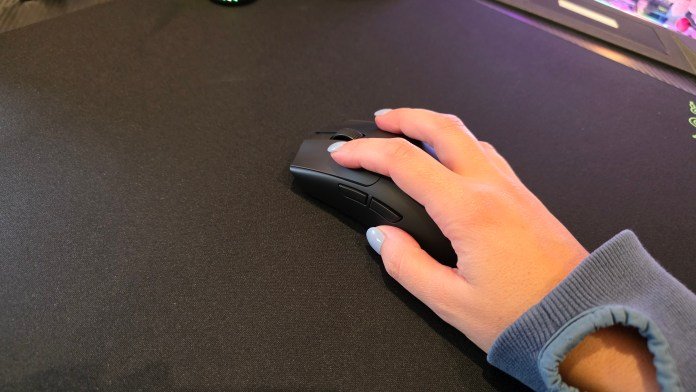
Razer’s latest push into the competitive gaming space isn’t just about raw specs or flashy upgrades, it’s about refinement. With the Razer Viper V4 Pro and Razer Gigantus V2 Pro, this feels like a coordinated effort to deliver a complete setup—mouse and surface—tuned to work together. After spending time with both, that pairing approach really
Razer’s latest push into the competitive gaming space isn’t just about raw specs or flashy upgrades, it’s about refinement. With the Razer Viper V4 Pro and Razer Gigantus V2 Pro, this feels like a coordinated effort to deliver a complete setup—mouse and surface—tuned to work together.
After spending time with both, that pairing approach really does matter more than you’d expect.
A mouse that almost disappears in your hand
The first thing you notice about the Razer Viper V4 Pro is just how light it is. This is one of those devices that genuinely makes you do a double take when you pick it up. It almost feels like you’re not holding anything at all.

That ultra-lightweight design translates directly into use. Fast flicks feel effortless, micro-adjustments feel more precise, and long sessions are noticeably less fatiguing. It’s not just about shaving grams, it’s about removing friction between you and what’s happening on screen.
Razer has kept things very “all business” here. There’s no RGB, no unnecessary flair, just a clean, matte finish and a shape clearly designed for performance. It feels like a tool, not a toy.
Out of the box, you get everything you need. There’s a cable, wireless dome, grip tape, and the usual extras like stickers and manual. Importantly, you can plug the mouse into your computer directly with the USB cable to start using it immediately while it charges. No waiting around.

The Razer Viper V4 Pro comes with the same beautiful dome that we saw with the Razer Deathadder V4 Pro. The Viper V4 Pro however, does feel like it has a more matte finish. Like the dome on the Deathadder V4 Pro, it also houses indicator LEDs for power and DPI, which are super useful without being distracting.

In use, the scroll wheel on the mouse stands out with a really tactile feel. Combined with the click response and overall responsiveness, it delivers that tight, controlled feedback you want in competitive titles.
The mousemat actually matters… way more than I expected
Pairing the Razer Viper V4 Pro with the Razer Gigantus V2 Pro is where things get interesting.
At a glance, the different surface options—Max Control, Control, Balance, Speed, and Max Speed—might sound like marketing fluff. But once you actually use them, the differences are very real. I tested the Balance and Control variants, and while they feel similar to the touch, they behave very differently once a mouse starts moving across them.

The Balance mat sits in that middle ground with medium friction. It’s fine, predictable, and probably what most people are used to. But the Control mat is where things clicked for me.
Despite being labelled as higher friction, it actually felt better to use, for me at least. The glide had more character, with a slightly more deliberate movement that made it easier to stay precise without feeling slow. It sounds counterintuitive, but the added resistance gave me more confidence, especially in smaller adjustments.

Even moving just one step between Balance and Control, the difference was noticeable. That suggests the gap between Max Speed and Max Control would be huge. And that’s exactly the point. Razer is giving players a real choice here, not just minor variations.
One interesting quirk is how the mouse “sticks” slightly when stationary. When you go to lift it, there’s a tiny bit of resistance. It’s subtle, but it reinforces that feeling of control and stability when you’re holding position.

Designed to work together
Using the Razer Viper V4 Pro across both surfaces highlights how much the mouse and mat influence each other. On the Balance mat, the mouse feels freer, faster, and more fluid. On the Control mat, it feels more locked in, more deliberate, and more precise.

Neither is objectively better, it comes down to personal preference. The key takeaway is that the mouse is sensitive enough to reflect those differences clearly. That’s exactly what you want from a high-end sensor and lightweight design.
This is where the “pro” positioning starts to make sense. It’s not just about having the best mouse or the best mat, it’s about having a system where small changes actually translate into meaningful differences in gameplay.
Software that stays out of the way when you need it to
Razer Synapse continues to be a strong companion piece. Setup is straightforward, and it even greets you with a little congratulatory message when you connect a new device. It’s the small touches that make a big difference.
From there, you get all the expected controls:
- Battery percentage tracking
- Firmware updates
- DPI stage configuration (I set mine to five levels)
- LED customisation for indicators
- Hypershift for expanded button functionality

The flexibility is there if you want it, but importantly, you don’t have to dive deep to get a great experience. You can always leave everything on the default, and tweak as needed. That’s why I like Synapse so much. It’s there when you need it, and stays away when you’ve configured everything.

Final thoughts
The Razer Viper V4 Pro and Razer Gigantus V2 Pro aren’t about reinventing the wheel. They’re all about refining it to a level that competitive players will appreciate.
The mouse delivers exactly what it promises: an ultra-lightweight, no-nonsense performance tool that feels like an extension of your hand.
The mousemat, surprisingly, plays an equally important role. The different surface options aren’t just gimmicks. They meaningfully change how the mouse behaves, and finding the right one can genuinely improve your experience.
Together, they form a setup that feels cohesive, intentional, and very clearly aimed at players who care about the details. This isn’t about RGB or flashy features. It’s about consistency, control, and shaving off those tiny margins that can make a difference. And in that context, Razer has absolutely nailed it.
If you want this duo, grab the Razer Viper V4 Pro for $279.95 AUD from the Razer store. At the checkout, you can add the Gigantus V2 Pro Balance for $89.95 AUD. Otherwise, you can purchase any of the Gigantus V2 Pro versions as a standalone for $89.95 AUD. Or pay an extra $30 AUD for the special NiKo edition.



















Leave a Comment
Your email address will not be published. Required fields are marked with *