
If you take a quick tally of every connected gadget under your roof, the total might surprise you. Between phones, tablets, smart TVs, security cams, streaming dongles, and Wi-Fi plugs, modern households are running miniature enterprise networks, often without any dedicated network security management. According to the latest 2026 IoT Security Landscape Report released by
If you take a quick tally of every connected gadget under your roof, the total might surprise you. Between phones, tablets, smart TVs, security cams, streaming dongles, and Wi-Fi plugs, modern households are running miniature enterprise networks, often without any dedicated network security management.
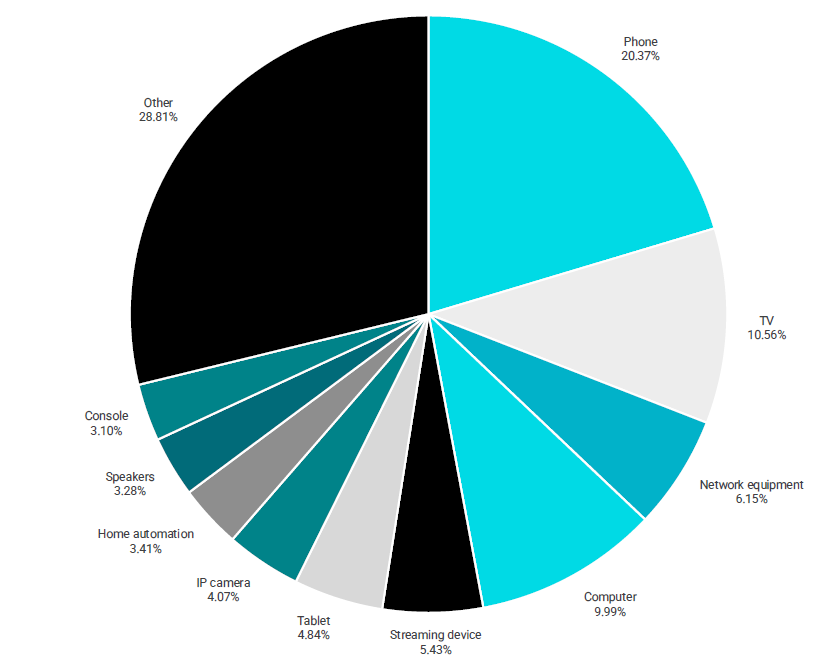
According to the latest 2026 IoT Security Landscape Report released by NETGEAR and Bitdefender, the average household now connects 24 smart devices, up from 22 last year.
Drawing from telemetry across 10.4 million smart homes globally—evaluating a staggering 5.4 billion security events and 1.2 billion vulnerability observations—the findings make one thing painfully clear: cybercriminals have shifted their attention away from locked-down phones and PCs straight toward the unmonitored gadgets plugged into your living room wall.
The biggest blindspots: TVs, plugs, and NAS drives
When people think about cybersecurity, laptops and phones usually get all the attention. Yet the report shows that the vast majority of real-world vulnerabilities stem from low-maintenance, set-and-forget hardware.
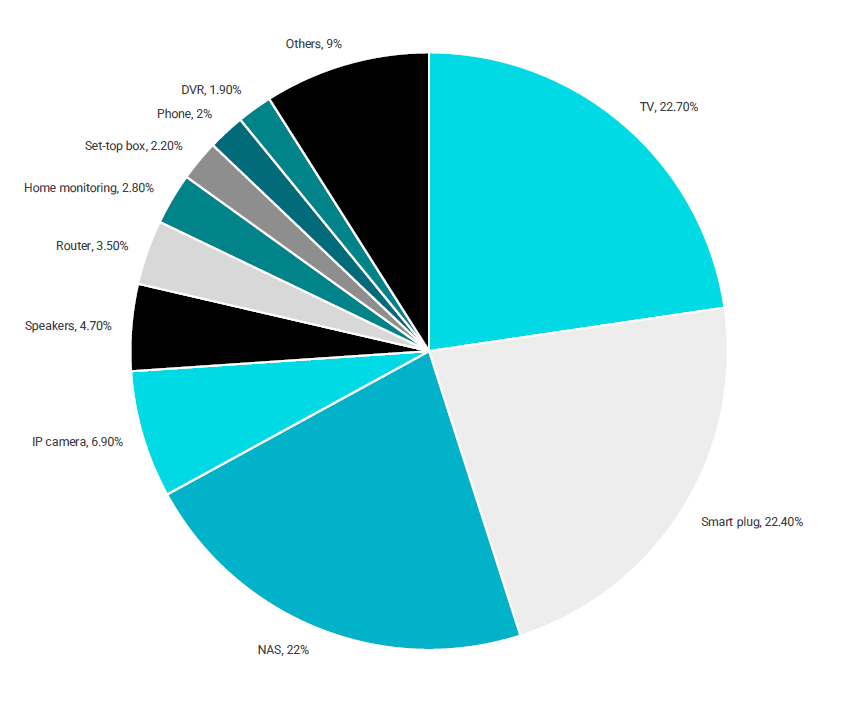
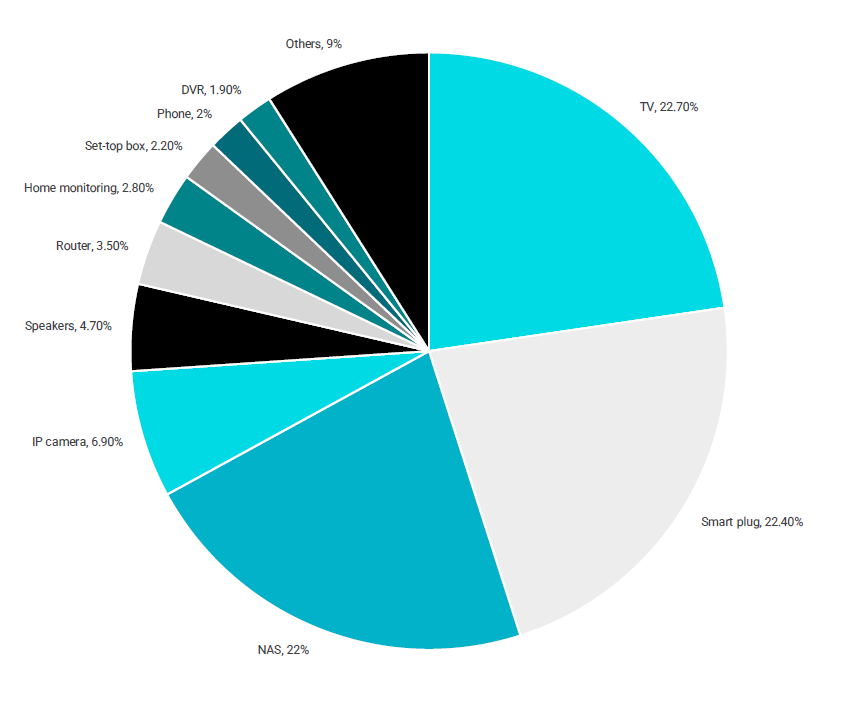
Together, just three categories account for 67.1% of all observed device vulnerabilities:
- Smart TVs: 22.7% (leading all categories with 270.3 million vulnerability observations)
- Smart Plugs: 22.4%
- Network-Attached Storage (NAS): 22.0%
Smart TVs have become the ultimate double-edged sword. They are packed with processing power, microphones, and network permissions, yet consumers routinely treat them like passive appliances. Public reports suggest that TVs can use the technology available inside them to pick up voice recordings, location data, and details about what other devices are connected to the same network… even when the TV is off.
Worse, researchers highlighted emerging cases where rogue code bundled into third-party smart TV apps secretly turned household connections into proxy relays, funneling outside online traffic through home internet connections without user awareness.
19 million knocks on the door every single day
Attackers aren’t waiting around for someone to click a phishing link. Over a nine-month period, the telemetry tracked 4.85 billion automated port scans, which is roughly 19.2 million scans every single day.
Automated reconnaissance represented 90.1% of all detected attack activity, with bots endlessly probing residential IP addresses looking for open doors, unpatched firmware, and exposed ports to recruit into botnets.
The real culprit: Outdated hardware
You might expect weak passwords to top the list of failure points, but basic credential cracking barely registered. Instead, 99.97% of observed vulnerabilities were publicly documented security flaws (also known as Common Vulnerabilities and Exposures, or CVEs).
The issue isn’t zero-day exploits developed by nation-states; it’s basic digital hygiene. Consumers buy a smart appliance, set it up once, and leave it plugged in for five to ten years, long after the manufacturer stops issuing security patches.
What you can do to lock down your smart home
There’s a lot in the report suggesting that we are vulnerable to having all our information taken away from us and misused. With everything reported, it can feel like a losing battle. However, there are several things you can do to protect yourself and your home.
Safeguarding a home network cannot rely on installing an antivirus app on your laptop and calling it a day. When every light bulb, power plug, and television has an IP address, security has to happen at the infrastructure level. Yes, strong passwords are still absolutely mandatory, yet there is more you can do to help. Here are the most effective steps to protect your home:
- Segment your Wi-Fi network (Use an “IoT” or “Guest Network”). Most modern Wi-Fi 6, 6E, and Wi-Fi 7 routers let you broadcast an isolated Guest or dedicated “IoT” network. Keep your critical devices—work laptops, primary phones, personal computers, and NAS drives holding sensitive data—on your primary Wi-Fi. You can then push all smart TVs, smart plugs, robotic vacuums, and cheap smart bulbs onto the separate guest/IoT network. If a cheap Wi-Fi plug gets compromised, the attacker is walled off from your private data.
- Audit and retire “Zombie” hardware. If you have an old smart TV, IP camera, or streaming stick that hasn’t received a firmware update in two or three years, it is effectively abandoned software. Consider disabling its Wi-Fi entirely and plugging in an actively supported streaming player that receives frequent security rollouts.
- Enable router-level threat filtering. Because you cannot install endpoint security software on a smart light bulb or television, protection has to sit at the router gateway. Platforms like NETGEAR Armor (powered by Bitdefender) run real-time packet inspection and vulnerability scanning right at the router level, automatically blocking malicious outbound traffic and alerting you when a smart device starts pinging unusual remote servers. It’s also a good idea to update your router regularly.
- Turn off “Remote Management” and “UPnP”. Unless you specifically require remote access to your router management portal while away from home, disable “Remote Management” in your router settings. Additionally, disable UPnP (Universal Plug and Play) if your setup allows; automated UPnP port forwarding is one of the easiest ways rogue devices punch holes straight through your firewall.
- Enforce strong firmware update schedules. Set a calendar reminder every quarter to log into your router and IoT companion apps to check for manual firmware updates, or enable automatic updates wherever supported.

With Australian homes continually adding smart tech to every room, our domestic networks look more like corporate branch offices every day. Treating your router as the first and primary line of defense is no longer optional, it’s the baseline.
Securing your home
The convenience of a connected home is tough to beat, but the days of simply plugging in a smart gadget and forgetting about it are well behind us. As the sheer volume of IoT hardware continues to grow under every roof, keeping our personal data safe means treating the home network with the same vigilance we give our work setups.
Taking half an hour this weekend to update your router firmware, segregate cheap gadgets onto a guest network, and decommission outdated hardware is a small investment of time that pays massive dividends for your digital privacy.
Keep following us for the latest insights.